In this article: What Error Code 25 means and how to clear it, starting with the most common cause — a parking brake left engaged.
This Article Applies to the Following Bikes
Difficulty
★☆☆ Easy
Estimated Time
0–5 Min
Before You Start
Tools you will need
- Adjustable wrench (included in your bike tool kit)
- Multitool with Allen wrenches (included in your bike tool kit)
Preparation
- Power off your bike.
- Ensure the bike is stable on its kickstand.
What Error Code 25 Means
Error/Fault 25 indicates that the Electronic Brake Shutoff (EBS) is active.
Each brake lever has a sensor that tells the motor to stop the moment the brake is pulled. Whenever the display shows Error 25, the bike believes a brake is being held.
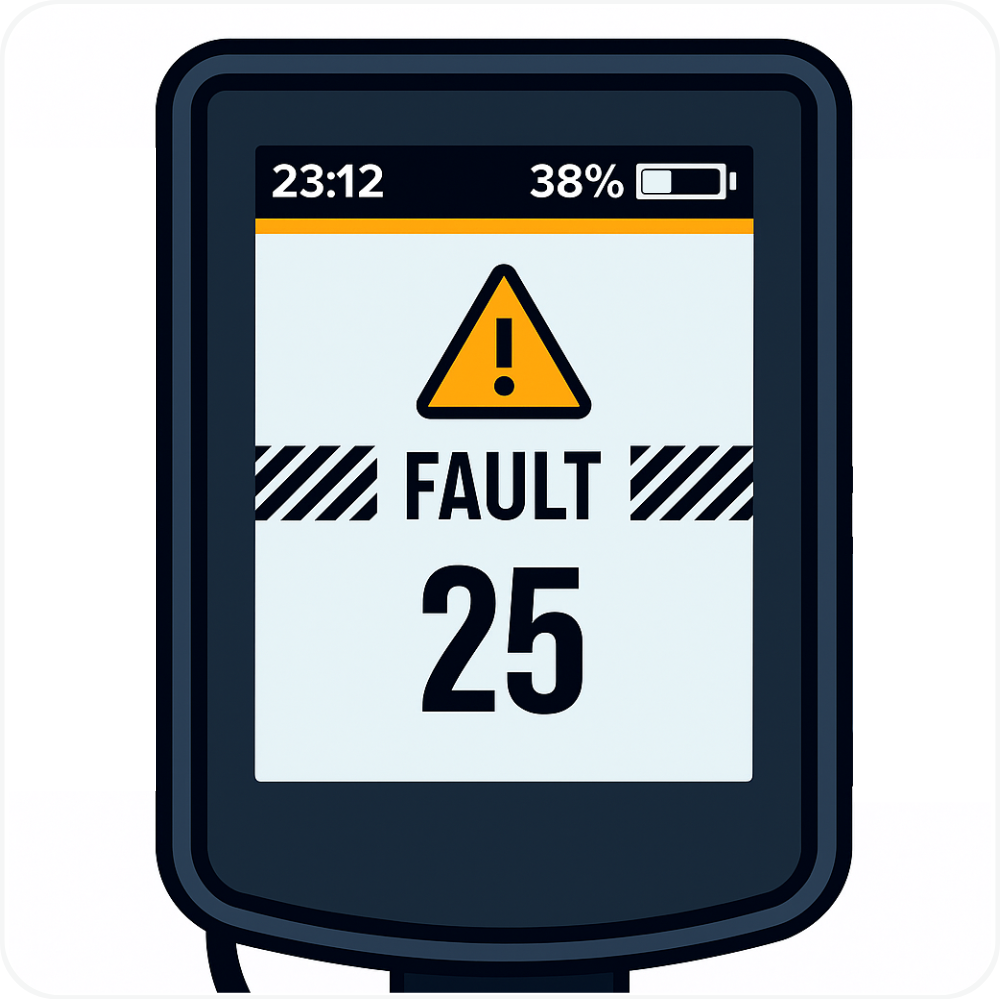
Start Here: Check the Parking Brake
This is the most common cause of Error 25. The parking brake works by holding a brake lever down, and the sensor in that lever cannot tell the difference between the parking brake and your hand. As long as it is engaged, the motor stays off and the display shows Error 25. Release the parking brake, and the error code should clear.
⚠️ Note: The parking brake is only available on MOD Easy / Sahara and MOD Groove.
Steps
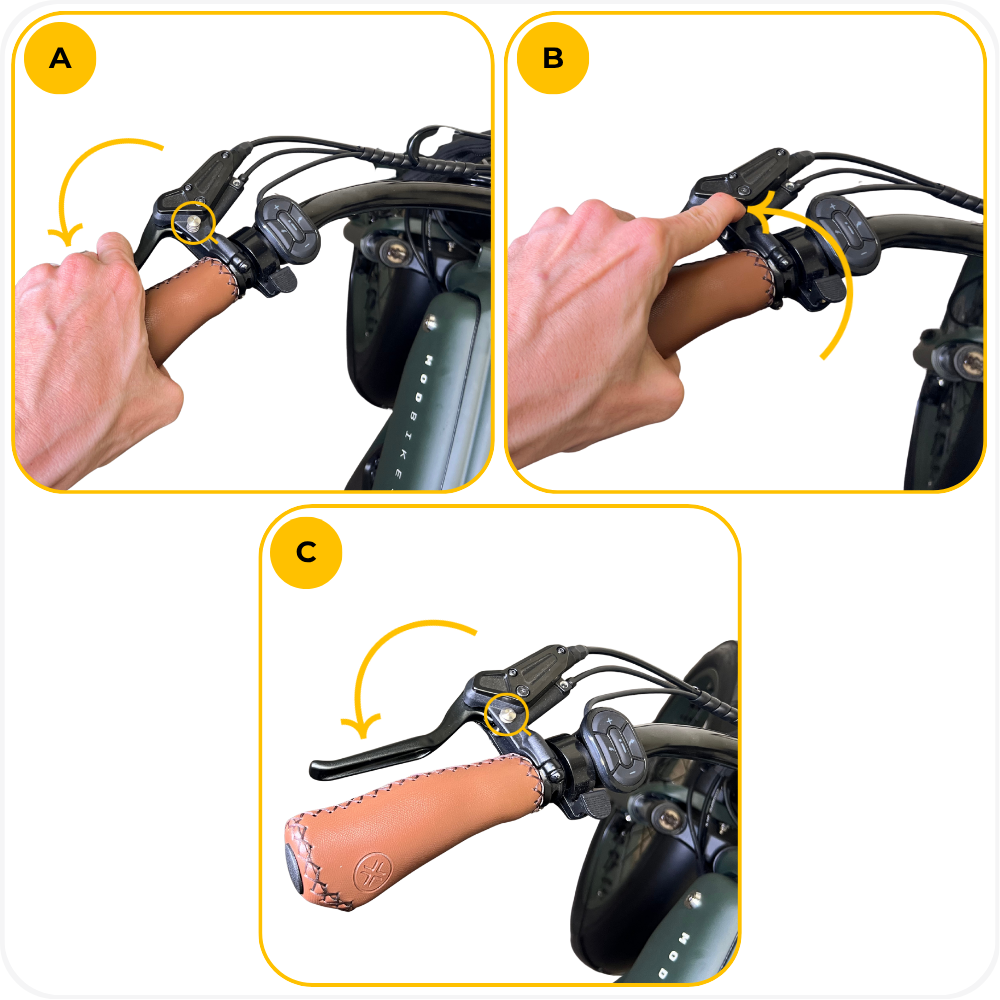
- Look under each brake lever for the small silver knob.
- If the knob is pushed down and the lever is being held in, the parking brake is engaged.
- Squeeze the brake lever firmly to release the knob, then let the lever return to its normal position.
- Confirm the lever sits fully out and the wheel spins freely.
- Power the bike back on.
The parking brake knob:
If the error clears, no further action is needed.
Release the Brake Levers
Even with the parking brake off, a lever that is sticking, snagged on a cable, or not returning fully will keep the sensor engaged.
Steps
- Make sure both brake levers are fully released and returning on their own.
- Power the bike back on.
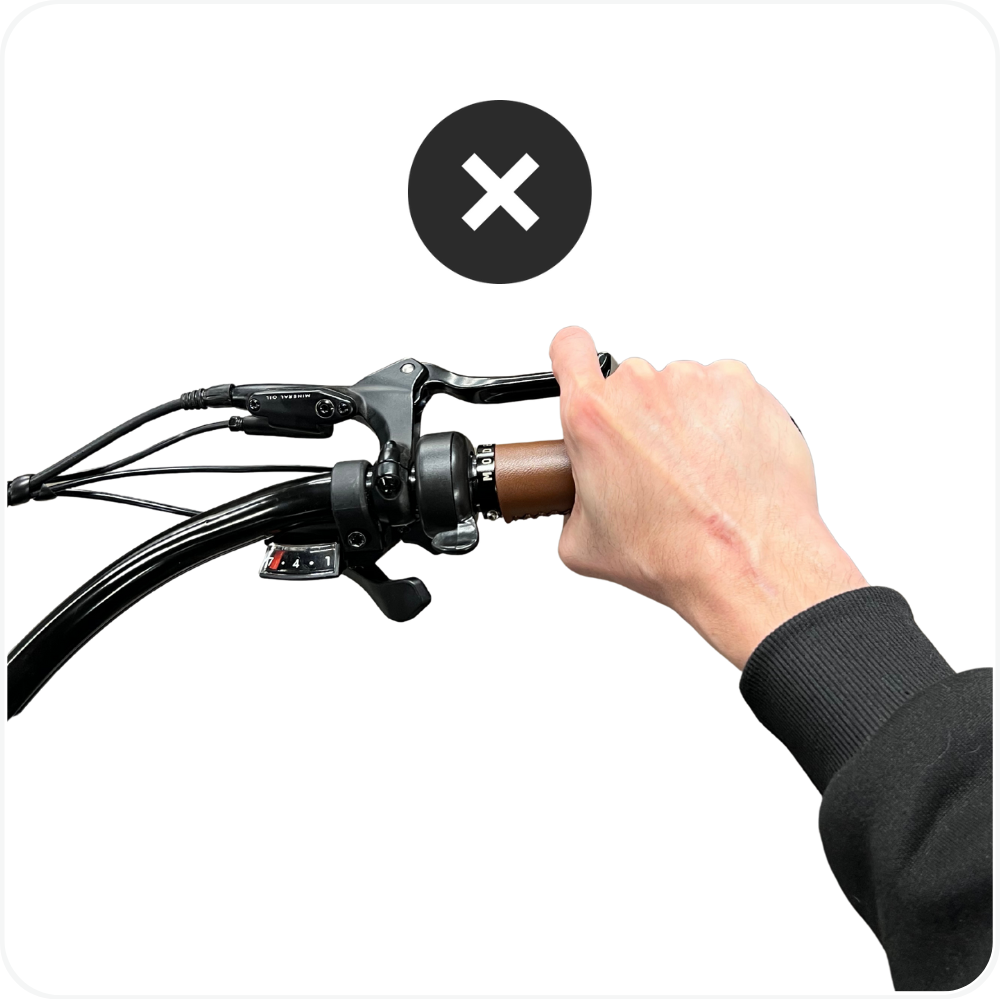
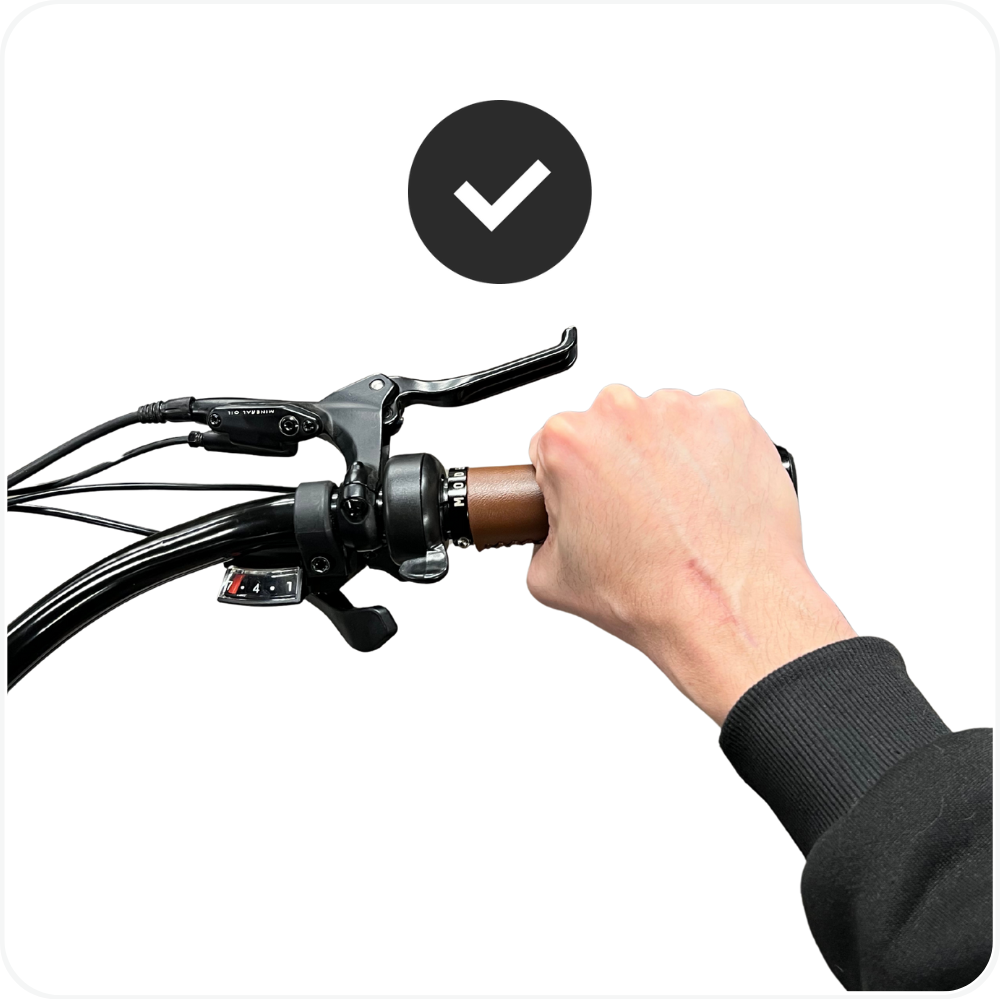
If the error clears, no further action is needed.
Adjust Motor Inhibitors (Brake Sensors)
Your bike has two motor inhibitors, one per brake lever. Their job is to instantly cut motor power when braking.
If they become misaligned, loose, or too tight, the bike may think you are braking even when you are not — causing Error/Fault 25 to appear on the display.
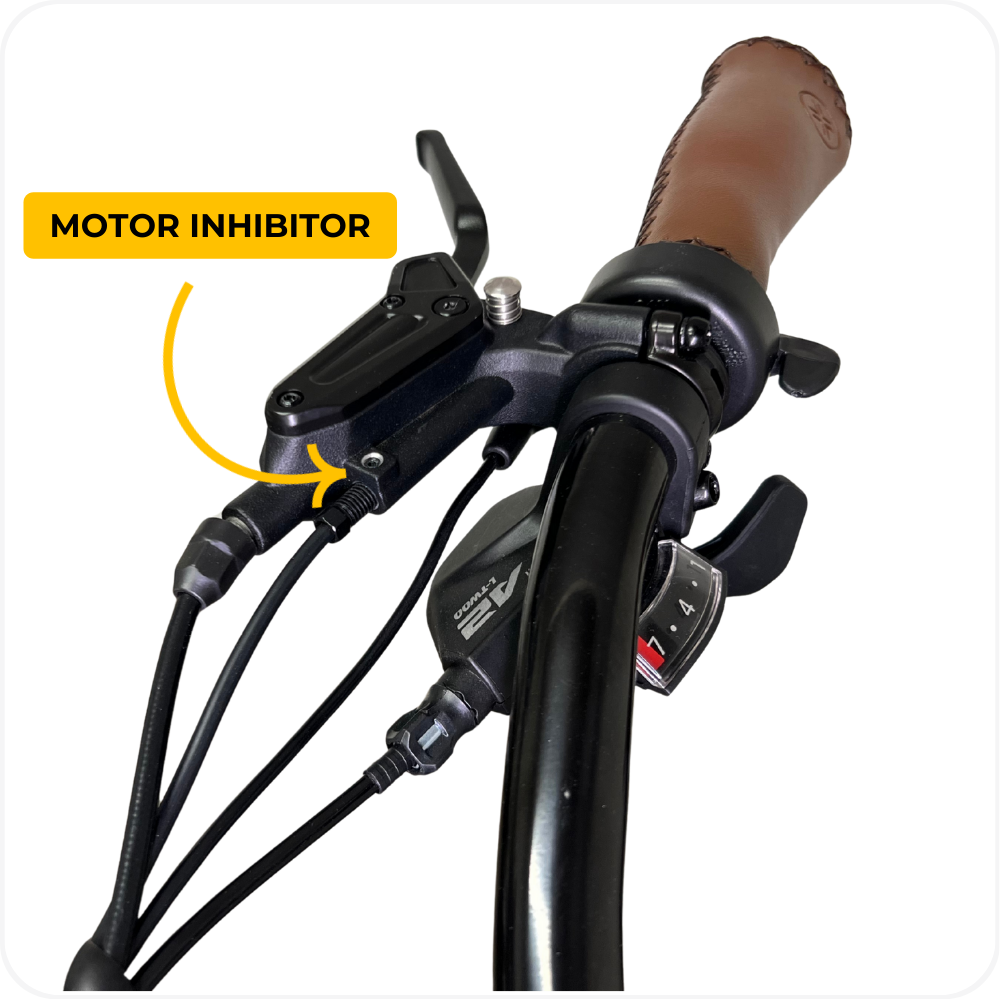
Steps
- Locate the small set screw and loosen it about two full turns using the smallest (2mm) Allen wrench in your multitool.
- Using your adjustable wrench, gradually turn the bolt securing the cable outward until Error/Fault 25 clears.
- Re-tighten the 2mm set screw.
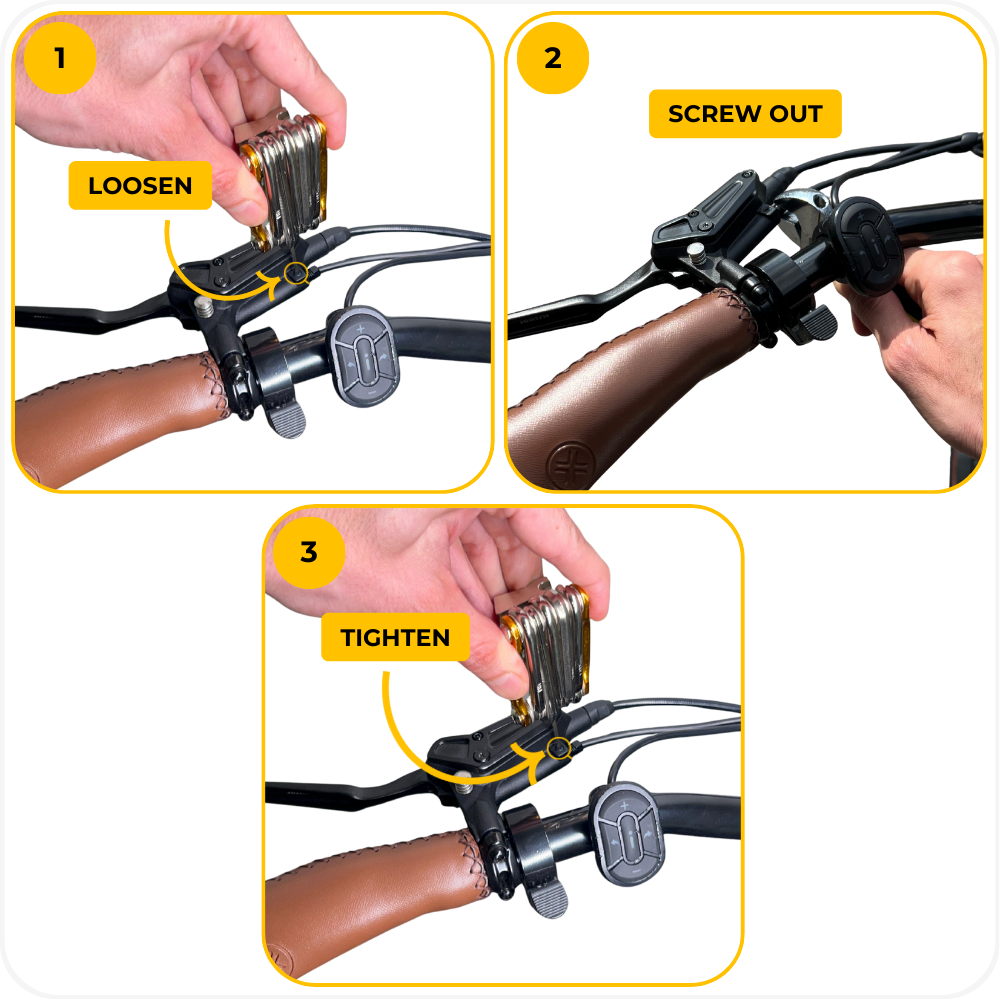
If the Bike Still Displays Error/Fault 25
If you have completed all steps above and the bike still displays Error/Fault 25, please submit a support ticket so our MOD BIKES team can guide you through advanced diagnostics.
Troubleshooting
- Error 25 on a bike with a sidecar → Check the parking brake first. It is the most common cause, and sidecar riders use the parking brake far more often.
- Bike displays Error 25 → Ensure both brake levers are fully released, then power the bike back on.
- A brake lever does not spring back on its own → Check that the parking brake knob is released and that no cable is snagged before adjusting anything.
- Brake sensor too tight → Loosen the small set screw on the brake sensor about two turns until Error 25 clears.
- Error 25 returns while riding → A sensor is likely on the edge of its range. Re-adjust the motor inhibitor on that side, then submit a ticket if it comes back.
FAQs
- What causes Error 25?
A brake lever is engaged, the parking brake is left on, or a brake sensor is adjusted too tightly. - My parking brake is engaged. Is that causing Error 25?
Yes. The parking brake holds a brake lever down, and the sensor in that lever cuts motor power. Release the parking brake and the error should clear. - Why does this happen more often with a sidecar?
A bike with a sidecar attached will roll away without the parking brake engaged, so sidecar riders use it much more often — and it is easy to forget to release it before riding. - Will Error 25 stop the bike from functioning?
The motor cuts off whenever the brake sensor detects the lever is pulled. The bike functions normally once the brakes are fully released. - Can I ride with Error 25 showing?
You can pedal, but you will have no motor assistance until the error clears. Clear it before riding so you are not relying on an unpredictable motor.
Warning
⚠️ Important Safety & Liability Notice

Error 25 is a safety feature that shuts off the motor whenever the brakes are engaged. Only attempt to adjust the brake sensors if you are confident in performing small mechanical adjustments. Improper adjustments may result in unexpected motor or brake behavior, which could lead to injury or damage.

If you are unsure, please seek assistance from a qualified MOD BIKES technician. MOD BIKES is not liable for injury, damage, or loss caused by improper use, adjustment, or failure to follow these instructions. Always follow local laws and manufacturer guidelines.
Was this article helpful?
That’s Great!
Thank you for your feedback
Sorry! We couldn't be helpful
Thank you for your feedback
Feedback sent
We appreciate your effort and will try to fix the article